
Discord markdown formatting, all of it
Bold, headers, lists, spoilers, subtext, code blocks and quotes. What Discord actually supports, and where each one stops working.
Md Shahriyar Alam
a month ago
Discord supports more formatting than most people use, and the useful half was added quietly enough that plenty of long-time users have never seen it.
Here is the full set.
Text
| Write | Get |
|---|---|
**bold** | bold |
*italic* or _italic_ | italic |
__underline__ | underlined |
~~strikethrough~~ | struck through |
***bold italic*** | both |
||spoiler|| | hidden until clicked |
Headers and subtext
# Big header
## Medium header
### Small header
-# Subtext
Three header sizes, and subtext — smaller, greyed out, sits under whatever it follows. Subtext is the one people miss, and it is the right tool for a caption, a source note or a "last updated" line that should not compete with the body.
Lists
- an item
- another item
  - a nested item

1. first
2. second
Two spaces of indent nests a list. Numbered lists renumber themselves, so you can write 1. all the way down.
Quotes
> a single quoted line

>>> everything after this
is quoted, including
new lines
> quotes one line. >>> quotes the rest of the message. The second is what you want for pasting something long.
Code
Inline with single backticks, and blocks with three:
```python
cooldown("1 day", key=user.id)
```
Name the language after the opening backticks for syntax highlighting. Discord knows most of them.
Code blocks are also the honest way to paste anything that would otherwise be mangled — a config, a log line, an id.
Links
[text](https://example.com) renders as a clickable phrase — but only inside an embed description. In a normal message you get the literal brackets.
This trips people up constantly. If you want a tidy link, it has to be in an embed. In a plain message, post the bare URL.
Wrap a URL in angle brackets to stop the preview: <https://example.com>.
Mentions and references
| Write | Renders as |
|---|---|
<@USER_ID> | a user mention |
<@&ROLE_ID> | a role mention |
<#CHANNEL_ID> | a channel link |
<:name:ID> | a custom emoji |
<a:name:ID> | an animated custom emoji |
<t:UNIX:R> | a live timestamp |
Channel links are underused. <#123...> renders as a clickable channel name that stays correct when the channel is renamed, which a typed #general does not.
Escaping
Backslash before a character to show it literally: \*not italic\*.
Useful when writing about formatting, or when a member's name contains underscores.
Where formatting does not apply
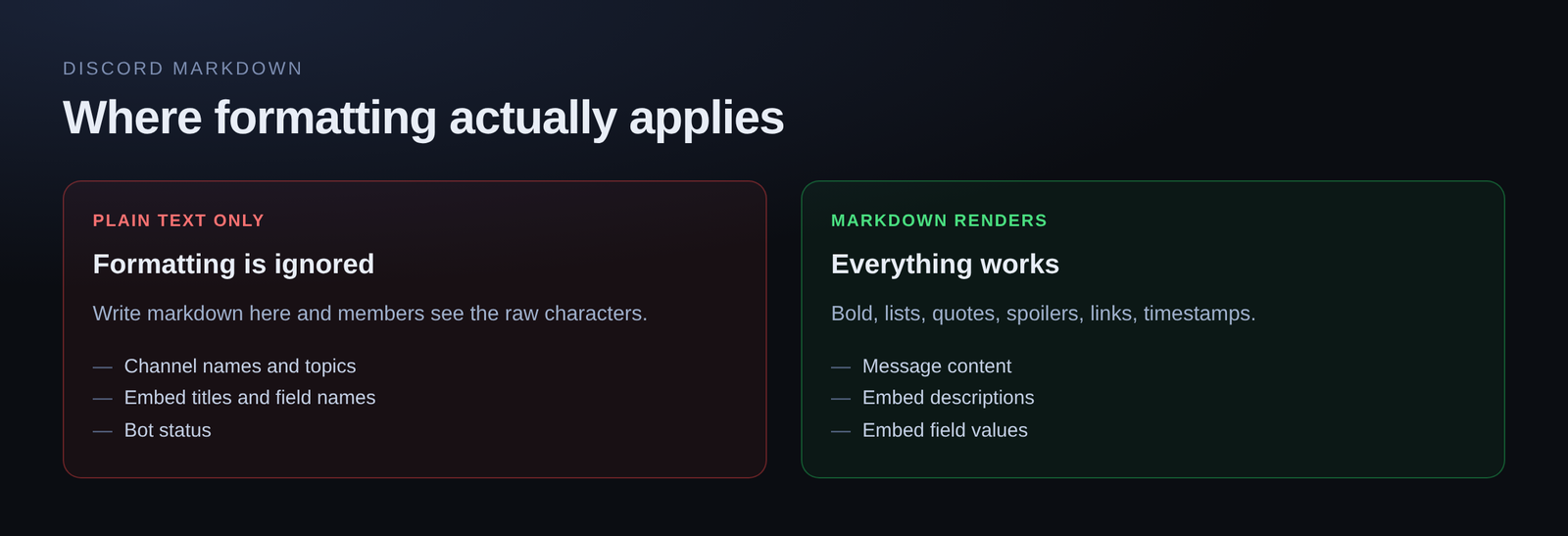
- Channel names and topics — plain text
- Embed titles, author names and field names — plain text
- Bot status — plain text
Formatting works in message content, in embed descriptions, and in embed field values. Nowhere else.
Building messages with formatting
Writing markdown blind and re-sending to check it is a slow loop, particularly with embeds where the rules differ by field.
Build them somewhere that renders exactly what Discord will render, as you type. Then the question "does this work in a field name" answers itself.
Loading comments…