
Introducing Components: build rich Discord layouts once, reuse them everywhere in Custom Commands
Build rich Discord layouts once with the new visual Components builder, then reuse them anywhere with a single line of code.
Md Shahriyar Alam
3 months ago
Discord messages have come a long way from plain text and a single embed. With Components V2, a message can be a fully composed layout — stacked sections, image galleries, dividers, accent-barred containers, buttons, and dropdown menus — all in one clean, native-looking block.
The catch has always been building them. Components V2 is powerful but verbose, and hand-writing the JSON for a nested layout is tedious and error-prone. Worse, if you wanted the same layout in five different commands, you copied that JSON five times.
Today we're fixing both problems with Components — a visual builder for Components V2, and a one-line way to load your saved layouts anywhere in your code.
What you can build
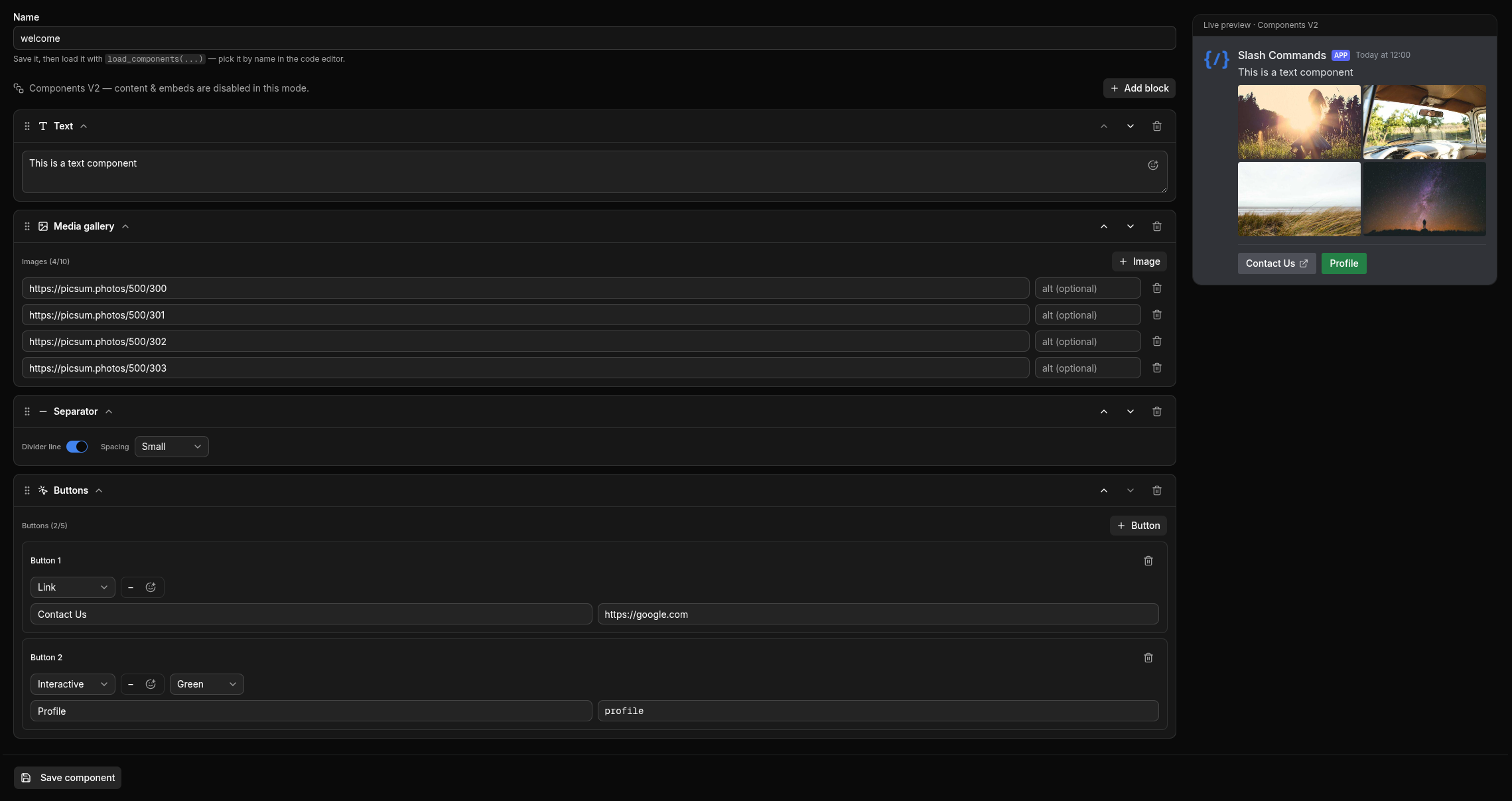
Open Components in the dashboard sidebar and you get a drag-and-drop canvas with a live Discord preview beside it. Everything you see is exactly how it renders in Discord.
The full component set is here:
- Text — markdown and emoji, just like a normal message.
- Section — a block of text with an accessory on the right: a thumbnail image or a button.
- Media Gallery — up to 10 images in a tidy grid.
- Separator — a divider line with small or large spacing, to give your layout breathing room.
- Container — a rounded panel with a colored accent bar (think of it as the modern embed) that holds any of the above.
- Buttons — up to 5 per row:
- Link buttons open a URL, no bot code required.
- Interactive buttons carry a custom ID and fire your existing Component Interaction event.
- Select menus — string dropdowns with your own options, or role / user / channel pickers.
Blocks are drag-and-drop sortable (with up/down arrows too), collapse to keep things tidy, and nest one level deep inside containers. Custom server emoji work everywhere — in text, on buttons, and in select options.
Load it in your code
Here's the part that changes how you build. Once you've saved a layout, you reuse it exactly like a saved embed — by id:
components = load_components("component_id")
send_message(channel_id, components=components)
Grab the id from the Components list, or let the code editor autocomplete do it for you: type load_components(" and pick your component by name — the id is inserted automatically. (Same trick works for load_embed.)
Variables are replaced for you
Every text field in a saved component — text blocks, section text, button labels, select placeholders and options — runs through the same variable replacement as the rest of your code. So one saved layout can render completely different content each time:
components = load_components("ticket_panel")
send_message(channel_id, components=components)
If ticket_panel contains text like Welcome, {user.mention}! You have {open_tickets} open tickets., each send fills in the live values. Build the layout once; the data changes per message.
Interactive components just work
Interactive buttons and select menus carry a custom ID. When someone clicks or selects, Discord routes it to your guild's Component Interaction event — the exact same handler system you already use. The Components builder just gives you a visual way to attach those custom IDs to a beautiful layout. No new concepts, no extra wiring.
Why it's built this way
A few deliberate choices worth calling out:
- One layout, one JSON row. A saved component is a single record — no tangle of sub-tables or relationships. It's easy to reason about, fast to load, and simple to back up.
- It mirrors embeds. If you already use
load_embed,load_componentsneeds no new mental model. Same load-by-id flow, same variable replacement, same editor autocomplete. - The bot stays lean. Your saved layouts are cached alongside embeds and refresh instantly when you edit them in the dashboard.
A quick example
Say you want a welcome panel: a header, a short intro, a rules button, and a role-select dropdown.
- Components → New component, name it
welcome_panel. - Add a Container (give it your brand accent color).
- Inside it: a Text block —
# Welcome to {server.name}! - A Section with intro text and a link button accessory pointing to your rules channel.
- A Separator.
- A Select menu (role type) with a custom ID your Component Interaction event handles for self-assign roles.
- Save.
Then, anywhere — a welcome event, a /welcome command, a scheduled job:
components = load_components("welcome_panel")
send_message(channel_id, components=components)
One layout, reused across your whole server, always rendering the latest data.
Try it
Components is live now. Open your dashboard, head to Components, and build your first layout. If you already know load_embed, you already know how to use it.
Build once. Reuse everywhere.
Loading comments…